
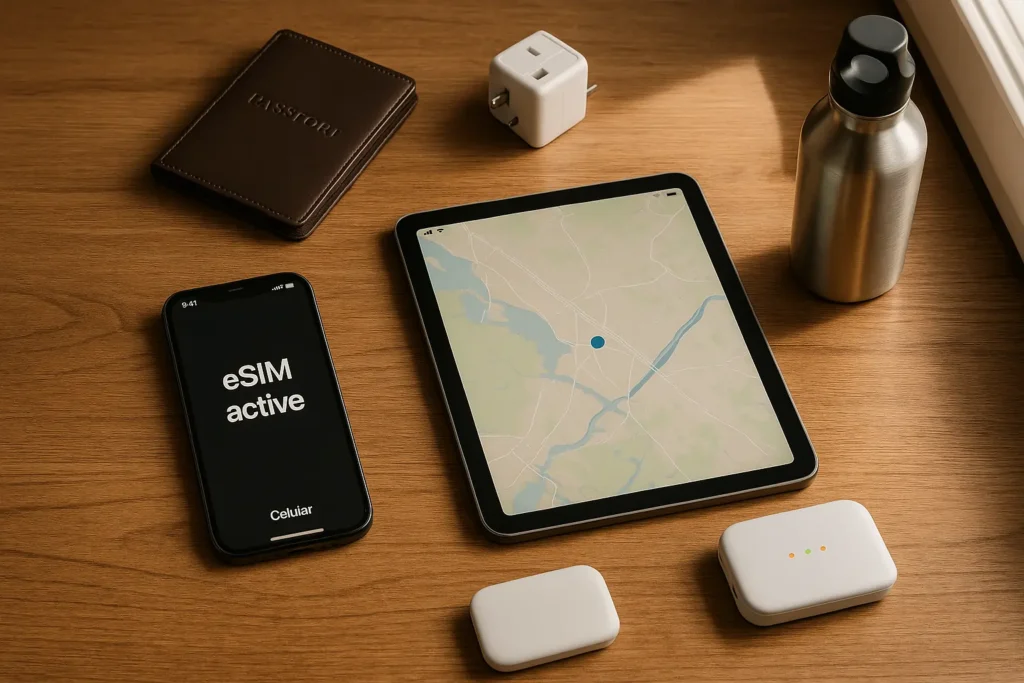
When it comes to staying connected abroad, eSIMs have revolutionized how travelers access mobile data. But the question remains: What’s the best device to use your travel eSIM on—your phone, tablet, or a dedicated hotspot?
Each option serves a unique travel style. Whether you’re a solo backpacker, a digital nomad, or a family on the move, the right device can make your travel experience smoother, safer, and more connected.
In this guide, we’ll break it down clearly:
- What phones, tablets, and hotspots with eSIM can do
- Which device fits which traveler
- Battery, cost, speed, and flexibility comparisons
- Travel-specific pros and cons
- Actionable takeaways to help you decide
At a Glance: Quick Comparison Table
| Feature | Phone | Tablet (eSIM) | Hotspot (eSIM) |
| eSIM Setup | Easy & built-in | Easy (on supported models) | May need manual QR activation |
| Best For | All-around use | Digital nomads, streaming | Groups, tethering multiple devices |
| Battery Life | Medium | Good | Long (8–12 hrs on average) |
| Data Sharing | Limited (hotspot drains fast) | Some sharing possible | Built for sharing |
| Weight & Portability | Lightest | Moderate | Extra item to carry |
| Offline Functionality | High (calls, SMS, apps) | Medium (data-focused) | None (requires connected devices) |
| Cost Efficiency | Most flexible | Good if used heavily | May need separate eSIM plan |
Option 1: Using eSIM on Your Phone
Using a travel eSIM directly on your phone is by far the most convenient and flexible solution.
Advantages:
- No extra devices or chargers to carry
- Instant access to maps, rideshare, payments, and contacts
- Built-in tethering for your tablet or laptop
- Works offline for essential tasks like calls or SMS if supported
Downsides:
- Battery drains faster if using GPS + data continuously
- Not ideal for sharing with multiple people
- Dual SIM management (if you have a physical SIM) can be confusing
Best For:
Solo travelers, short-term trips, or those who want maximum portability without extra tech.
Option 2: Using eSIM on a Tablet
Tablets like the iPad Air, iPad Pro, or some Android tablets with eSIM support can be incredibly useful for remote work, content consumption, or family travel. Not all tablets support eSIM. Refer to Apple’s guide to iPad models with eSIM for compatibility details if you’re using an iPad while traveling.
Advantages:
- Larger screen ideal for travel planning, maps, or entertainment
- Great for digital nomads or creators
- Can tether devices if your plan allows it
- Better battery life than phones under heavy browsing
Downsides:
- Heavier and less convenient to carry
- Can’t make traditional calls/SMS (unless VoIP is used)
- Fewer models support eSIM compared to phones
Best For:
Remote workers, frequent fliers, or families using tablets for navigation and streaming.
Option 3: Using eSIM on a Hotspot Device
A dedicated eSIM-compatible mobile hotspot (MiFi) connects multiple devices at once—without tying up your phone or tablet.
Advantages:
- Designed for sharing: perfect for families or group travel
- Long-lasting battery (some up to 15 hours)
- Avoids draining your main devices
- Easy switch between countries with global eSIMs
Downsides:
- Extra device to charge and carry
- Some setup complexity with QR or manual eSIM provisioning
- Doesn’t work independently—no apps, calls, or maps
Best For:
Families, travel bloggers, or small business travelers who need shared, stable connectivity.
Which eSIM Device Matches Your Travel Style?
| Traveler Type | Best eSIM Device |
| Solo Backpacker | Phone |
| Digital Nomad | Tablet |
| Family on Vacation | Hotspot |
| Remote Work Professional | Tablet or Hotspot |
| Budget Traveler | Phone |
| Adventure Traveler | Phone with rugged case |
Real Travel Scenarios & Use Cases

Scenario 1: Weekend Trip in Europe
A solo traveler flying into Paris uses an eSIM on their phone for train schedules, navigation, and local data—no local SIM or Wi-Fi needed.
Best Choice: Phone
Scenario 2: Long-term Remote Work in Bali
A digital nomad works from a beachfront café, uses an iPad Air with a regional eSIM plan for video calls, and connects their phone via hotspot.
Best Choice: Tablet
Scenario 3: Family Trip Across the U.S.
Parents install a global eSIM on a hotspot device to share data with two tablets and a laptop, keeping kids entertained and everyone connected.
Best Choice: Hotspot
Final Take: Which eSIM Device Should You Choose?
There’s no one-size-fits-all answer. It depends on how you travel:
- Choose a Phone if you want simple, all-in-one mobile data while staying light.
- Choose a Tablet if you need a large screen for work, video, or mapping.
- Choose a Hotspot if you’re traveling in a group or need to connect multiple devices at once.
Pro Tip: For most travelers, pairing an eSIM on your phone with a flexible hotspot plan as backup offers the perfect balance of mobility and reliability. For the best value on eSIMs—whether you’re using a phone, tablet, or hotspot—check out Travel eSIM Deals. We compare top providers and offer exclusive discounts to help you stay connected and save across multiple countries.
FAQs
Q. Can I use the same eSIM plan on my phone, tablet, and hotspot?
No — eSIMs are device-specific. You’ll need to activate separate eSIMs for each device unless your provider offers multi-device sharing.
Q. Which device is most reliable for international travel?
Your phone is the most reliable and flexible, but hotspots are better for sharing and tablets for productivity.
Q. Is it safe to rely only on eSIM abroad?
Yes, if set up correctly. Always activate your eSIM before departure and keep a backup option (e.g., offline maps or Wi-Fi).
Q. Do tablets support calls and texts with eSIM?
Not directly. Tablets use data-only plans, so you’ll need apps like WhatsApp, FaceTime, or Zoom for communication.
Q. What’s the best choice for battery life during long travel days?
Hotspots usually last longest (8–12 hours), followed by tablets. Phones drain fastest under constant data use.







Leave a Reply